Free scholarship application tracker for Canadian students
One spreadsheet for every scholarship you apply to. It counts down each deadline, turns red a week out, tracks the transcripts and reference letters each award needs, and adds up the money you're going after. It opens in Excel and Google Sheets.
Get the tracker free
Enter your email to create a free toolkit account and download the full 7-tab tracker straight away.
Free account, no card. You'll set a password on the next screen, then download. Already have an account? Sign in
What's inside the spreadsheet
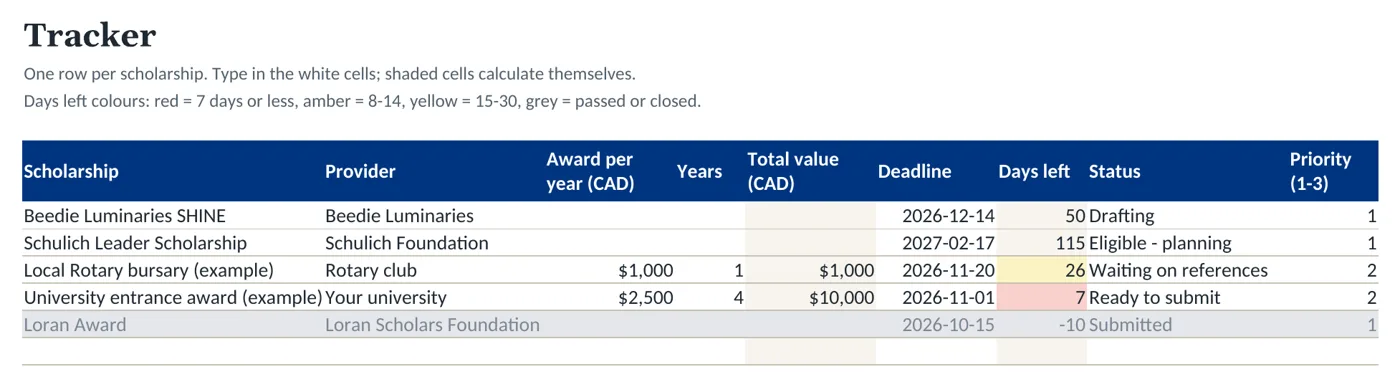
- TrackerOne row per scholarship: provider, link, level, award per year and years, total value, deadline, days left, status, priority, and whether your essay, references and transcript are done.
- RequirementsEvery item each scholarship asks for, with a dropdown that links it to the scholarship, a word limit, an early due date, and where you saved the file.
- ReferencesWho you asked, for which awards, and the date to ask by, which fills in as three weeks before each letter deadline. Overdue asks turn red.
- Essay BankEight common prompt themes, from community impact to financial need. Log each prompt you see and the story that answers it, so you adapt essays instead of starting over.
- SummaryYour next open deadline, how many close in the next 30 days, the total value you're applying for, what you've won, and a count by status.
- Canadian AwardsSchulich Leader, Loran, Beedie Luminaries, Canada Student Grants and the ended TD program, each with key dates and its official link.
- Start HereA 15-minute setup guide, what each colour means, and four habits that stop missed deadlines.
How to use it
- Download the .xlsx. In Google Sheets, choose File, then Import, and upload it. In Excel, just open it.
- Add one row per scholarship on the Tracker tab and type dates as 2027-02-17.
- List what each award asks for on the Requirements tab, then request transcripts and reference letters first, because they depend on other people.
- Set a status as you go. Submitted, won and skipped rows turn grey and drop out of the countdown.
- Check the Summary tab every Sunday and plan the week around whatever is red or amber.
Major Canadian deadlines already in the file
We checked these against each official page on October 24, 2026. Dates change every cycle, so confirm before you plan around one.
| Award | Key dates | Official page |
|---|---|---|
| Schulich Leader Scholarships | Your school nominates you by Jan 27, 2027. Your application and two reference letters are due Feb 17, 2027. | schulichleaders.com |
| Beedie Luminaries (B.C.) | Opens Nov 2, 2026. Closes Dec 14, 2026 at 1 p.m. PT. | beedieluminaries.ca |
| Loran Award | The 2027 cycle closed Oct 15, 2026. Applications open in early September each year. | loranscholar.ca |
| TD Scholarships for Community Leadership | Ended. TD accepts no new applications for 2026 and beyond. | td.com |
Start your list tonight
It takes about 15 minutes to add your first five scholarships. The file is free with a toolkit account.
Free account, no card. You'll set a password on the next screen, then download. Already have an account? Sign in
Questions
Is the tracker really free?
Yes. Create a free toolkit account with your email and you can download the full 7-tab tracker. No card is needed.
Does it work in Google Sheets?
Yes. In Google Sheets choose File, then Import, and upload the .xlsx. The dropdowns, colour warnings and formulas carry over. It also opens in Excel and LibreOffice.
How do the deadline warnings work?
The Days left column counts down from today. It turns yellow at 30 days, amber at 14 and red at 7. Rows you mark Submitted, Won, Not selected or Skipped turn grey.
Which scholarships are already listed?
The Canadian Awards tab lists Schulich Leader, Loran, Beedie Luminaries, Canada Student Grants and the ended TD Community Leadership program, with dates checked on October 24, 2026 and links to each official page.
Can I use it for bursaries, grants and university awards too?
Yes. Add any award as a row. The Level column covers high school, college, undergraduate and graduate.
Want a printable version for a binder? The tracker's PDF companion comes with Toolkit Plus ($19 CAD, one-time), along with the Deadline Calendar, Budget Planner, Personal Statement Starter Kit and Financial Aid Comparison Worksheet.